GUIDE · ANIMATE IN ILLUSTRATOR

Can you animate
in Illustrator?

Not with Illustrator alone: it has no timeline and no animation export. But your artwork is already perfect for motion, because it is vectors on layers. Here are the three ways designers make it move, from the slowest to the fastest, and when each one is the right choice.

01 — THE THREE WAYS

From frames by hand
to one click.

WAY 1 · FRAMES

Draw every frame

Put each frame on its own layer (Object › Release to Layers turns a blend or a group into a sequence), export the layers, then assemble them into a GIF in Photoshop's timeline. It works for short loops, but every change means redrawing frames, and the result is a GIF, not a vector animation.
WAY 2 · AFTER EFFECTS

Move the file to After Effects

Import the .ai into After Effects, convert the layers to shape layers, keyframe each one, then export video, or Lottie with the Bodymovin or LottieFiles plugin. The professional route for long pieces and compositing, and a long way from Illustrator for a logo reveal or a social post.

WAY 3 · A PANEL

Animate where the art is

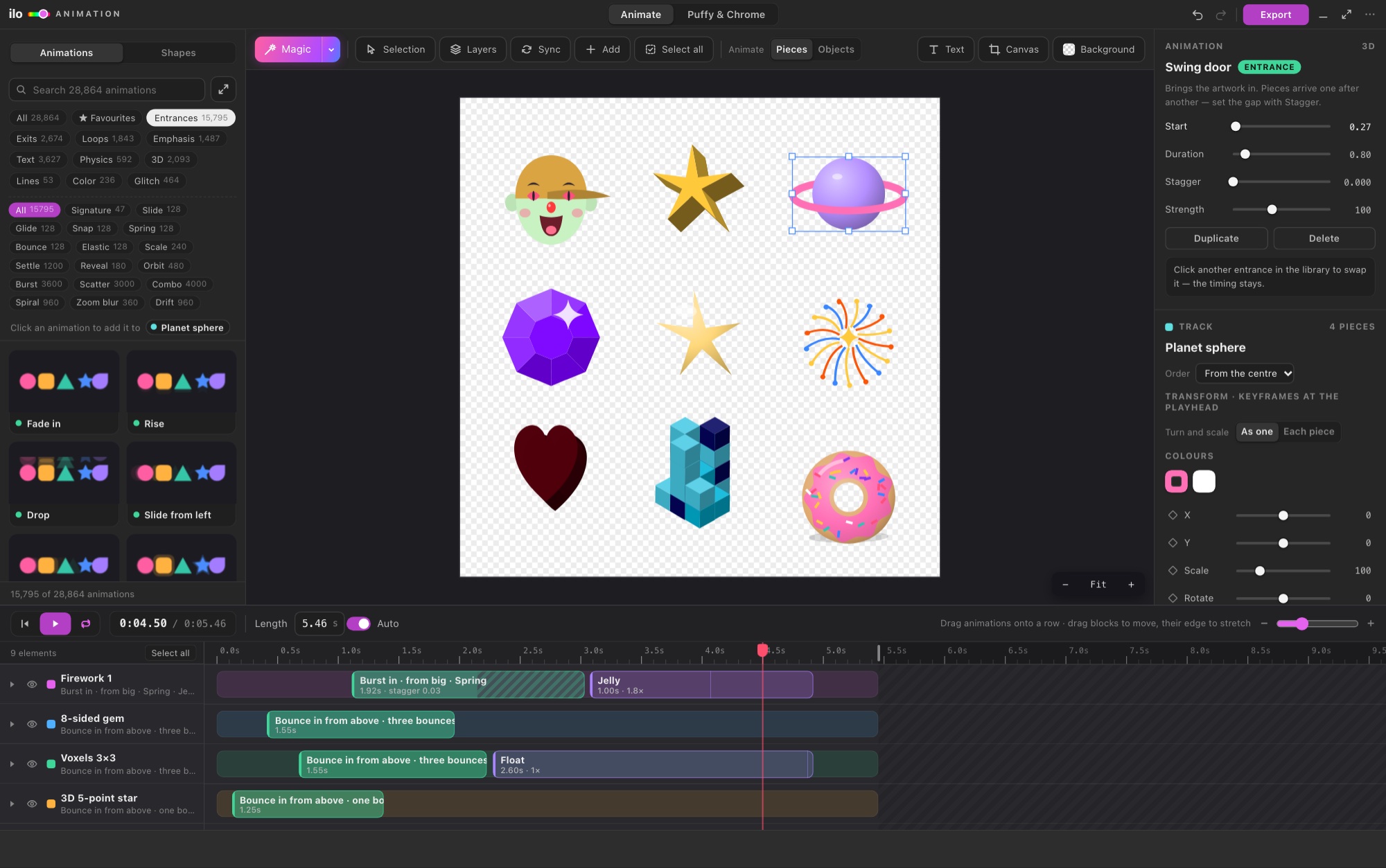
Ilo Animation is a panel inside Illustrator. Your layers become timeline rows, Magic gives every element its own move in one click, and you fine-tune with keyframes. Export Lottie, animated SVG, GIF, MP4 or WebM from the same window.

Ilo Animation inside Adobe Illustrator: the layers of the document as rows on a timeline

02 — THE FAST WAY, STEP BY STEP

Your first animation
in about a minute.

  1. 01

    Open the panel

    With your document open: Window › Extensions › Ilo Animation. Every object on your visible layers becomes a row, named as in the Layers panel.

  2. 02

    Press Magic

    Titles come in letter by letter, outlines draw themselves, shapes drop and bounce. Press again for another take, or choose moves from 28,864 animations.

  3. 03

    Export

    Lottie for websites and apps, animated SVG, GIF for chats and slides, MP4 for social, WebM with a transparent background for video.

No Illustrator on this computer? The same engine runs at ilotools.com/app: upload the .ai (or an SVG) and do the same three steps in the browser.

03 — QUESTIONS

Good to know.

Does Adobe Illustrator have a timeline?

No. Illustrator is a drawing tool: it has artboards and layers but no timeline and no animation export. Animation comes from another app (Photoshop, After Effects) or a panel such as Ilo Animation.

Can I export a GIF from Illustrator?

Illustrator can save a still GIF, not an animated one. To get a moving GIF you need frames assembled elsewhere, or a panel that animates the artwork and writes the GIF for you.

How do I make a Lottie from an Illustrator file?

Either through After Effects with the Bodymovin or LottieFiles plugin, or directly with Ilo Animation, which writes the Lottie JSON from your Illustrator layers. Step by step: Illustrator to Lottie.

Which Illustrator versions does Ilo Animation work with?

Illustrator 2023 or newer, on Mac and Windows. The online app works in a current Chrome, Edge or Safari, with no Illustrator at all.

What does it cost?

5 days free with every feature and no card. Then from the plans on the pricing page; a purchase is refundable within 72 hours.

Make your design
move.